

Appearance
BetterDocs Integration
BetterDocs is a user-friendly documentation and knowledge base plugin that you can integrate with Fluent Support. This will allow you to display relevant Documentation to the users when they type their issues in the Subject field of the ticket form under the Support Portal.
This article will guide you through integrating BetterDocs with Fluent Support.
BetterDocs Integration With FluentSupport
To integrate BetterDocs into FluentSupport , follow the steps with screenshots below —
NOTE
To ensure the BetterDocs integration works, the BetterDocs plugin must be installed and active on your website.
From the Fluent Support Dashboard, go to Settings and click on Ticket Form Config from the left sidebar. This will open the Ticket Form Settings page.
Configuration Steps
- Enable Suggestions: Check the box for Enable knowledge base suggestion on ticket creation form. This links your knowledge base to the ticket form.
- Select Post Types: Under the Knowledge Base Post Types section, select docs. This option appears because BetterDocs uses the 'docs' post type for its articles.
- Set Article Limit: In the Suggested Articles Limit field, define the maximum number of suggested articles you want to display (e.g., 5 or 15).
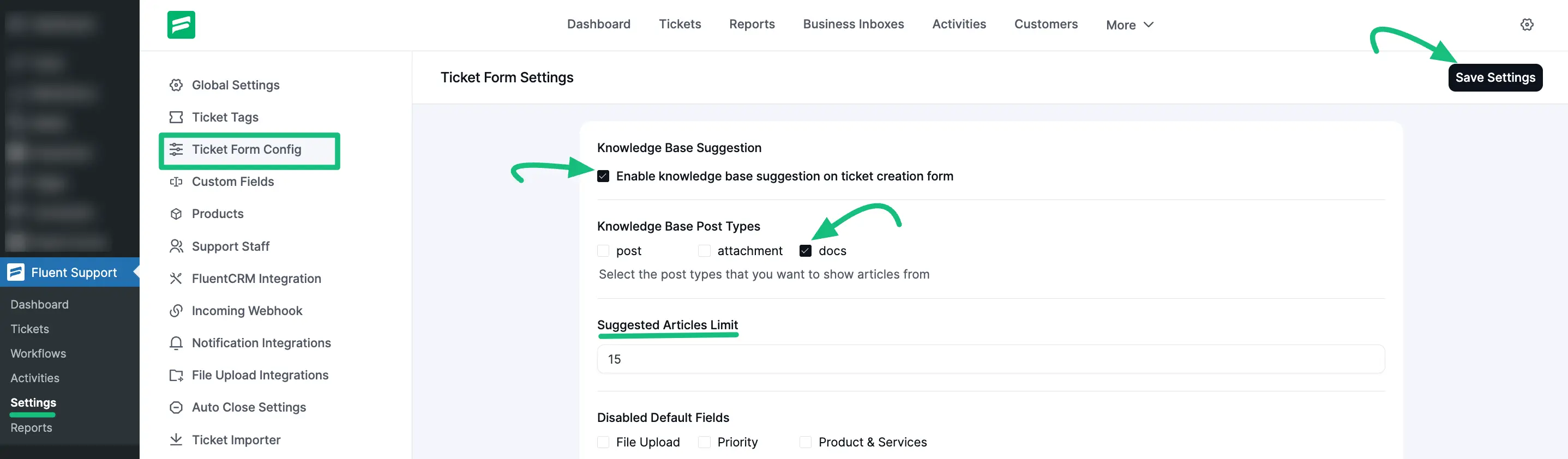
Once you have configured these options, do not forget to click the Save Settings button in the top right corner.
Now, when a user types keywords into the subject line of a support ticket, the system will automatically search your BetterDocs articles and display relevant documentation suggestions.
This is how the integration of BetterDocs with Fluent Support works!